| XL4, EXL6, EXLW, XL7, EXL10 | 15.64 | 9/18/23 | Enhancement | Added support for OCS-I/O (CNX100) modules. | Bootloader, Cscape 9.90 SP10 |
| XL4, EXL6, EXLW, XL7, EXL10 | 15.64 | 9/18/23 | Bug Fix | Resolved issue wherein device would PING for an invalid subnet mask configured. (8765) | Bootloader, Cscape 9.90 SP10 |
| XL4, EXL6, EXLW, XL7, EXL10 | 15.64 | 9/18/23 | Bug Fix | Resolved issue wherein after multiple power cycle LAN2 IP would not work in RCC2414. (10106) NOTE: Applicable to RCC only | Bootloader, Cscape 9.90 SP10 |
| XL4, EXL6, EXLW, XL7, EXL10 | 15.64 | 9/18/23 | Bug Fix | Resolved issue wherein MQTT with CA certificate configured was not connecting to broker (10212) | Bootloader, Cscape 9.90 SP10 |
| XL4, EXL6, EXLW, XL7, EXL10 | 15.64 | 9/18/23 | Bug Fix | Resolved issue wherein power cycle was required to recover the Modbus RTU communication when there was communication break while sending queries at high speed (10msec). (5843) | Bootloader, Cscape 9.90 SP10 |
| XL4, EXL6, EXLW, XL7, EXL10 | 15.64 | 9/18/23 | Bug Fix | Resolved issue wherein only limited number of users configured in user security configuration were working. (10016) | Bootloader, Cscape 9.90 SP10 |
| | | | Download >Download Firmware 15.64 Release Notes | | |
| XL4, EXL6, EXLW, XL7, EXL10 | CSCAN 15.62 | May 2023 | Enhancement | OCSIO support has been added along with new modules-DIM610 and DQM606. New modules require Cscape 9.90 SP9 onwards and OCSIO firmware | Bootloader |
| XL4, EXL6, EXLW, XL7, EXL10 | CSCAN 15.62 | May 2023 | Enhancement | Added new system registers for storing PGM password (%SR104 and %SR106) in order to avoid opening of password dialog when PGM is loaded via SR bits. (8345)
NOTE: This requires Cscape 9.90 SP9 onwards
%SR104–32bit %SR for storing password of program which is currently running
%SR106–32bit %SR for storing password of program which is being loaded | Bootloader |
| XL4, EXL6, EXLW, XL7, EXL10 | CSCAN 15.62 | May 2023 | Bug Fix | Resolved ethernet port lock up issues. (8464) | Bootloader |
| XL4, EXL6, EXLW, XL7, EXL10 | CSCAN 15.62 | May 2023 | Bug Fix | Resolved combining characters like Thai fonts were not displayed properly in Graphics Editor issue. (3878) NOTE: This requires Cscape 9.90 SP9 onwards. | Bootloader |
| XL4, EXL6, EXLW, XL7, EXL10 | CSCAN 15.62 | May 2023 | Bug Fix | Resolved device was displaying exception when used Copy_CF block – IEC issue. (7631) | Bootloader |
| XL4, EXL6, EXLW, XL7, EXL10 | CSCAN 15.62 | May 2023 | Bug Fix | Resolved DeviceNet issue. It was not working until the cable from CAN2 port of master was unplugged and plugged back in. (7443) | Bootloader |
| XL4, EXL6, EXLW, XL7, EXL10 | CSCAN 15.62 | May 2023 | Bug Fix | Resolved Q1 output was not going TRUE after online change issue. (8713) | Bootloader |
| XL4, EXL6, EXLW, XL7, EXL10 | CSCAN 15.62 | May 2023 | Bug Fix | Resolved Modbus Client protocol issue. It stopped working if more than 16 16-bit external registers / 8 32-bit external registers were used on screen. (9029) | Bootloader |
| XL4, EXL6, EXLW, XL7, EXL10 | CSCAN 15.62 | May 2023 | Bug Fix | Resolved issue when %R values were not retained after power cycle when HSC preload function was used. (5995) | Bootloader |
| XL4, EXL6, EXLW, XL7, EXL10 | CSCAN 15.62 | May 2023 | Bug Fix | Resolved alarm history was not listing all alarms on webpages issue. (1643) | Bootloader |
| XL4, EXL6, EXLW, XL7, EXL10 | CSCAN 15.62 | May 2023 | Bug Fix | Resolved MQTT NBIRTH/NDEATH packets were causing loss of communications issue. (8642)
NOTE: This requires Cscape 9.90 SP9 onwards. Added bdsequence number to the birth message packets | Bootloader |
| XL4, EXL6, EXLW, XL7, EXL10 | CSCAN 15.62 | May 2023 | Bug Fix | Resolved loss of communication issues with BACNet MSTP protocol for X5. (8881)
NOTE: X5 only. | Bootloader |
| XL4, EXL6, EXLW, XL7, EXL10 | CSCAN 15.62 | May 2023 | Bug Fix | Resolved communication issues with ethernet SmartRail bases. (8625) | Bootloader |
| XL4, EXL6, EXLW, XL7, EXL10 | CSCAN 15.62 | May 2023 | Bug Fix | Resolved CAN connectivity issues when unit was powered on with CAN port connected. (9064/9458) | Bootloader |
| XL4, EXL6, EXLW, XL7, EXL10 | CSCAN 15.62 | May 2023 | Bug Fix | Resolved extra verbiage issue displayed in Alarm summary and history listings on webpages. (9045) | Bootloader |
| XL4, EXL6, EXLW, XL7, EXL10 | CSCAN 15.62 | May 2023 | Bug Fix | Added time zone information in email header to avoid email sent from OCS being treated as spam emails. (9105) | Bootloader |
| XL4, EXL6, EXLW, XL7, EXL10 | CSCAN 15.62 | May 2023 | Bug Fix | Resolved reset issue during opening and closing of port when Modbus RTU master sends query at high speed. (5843)
NOTE: Device crash while opening and closing of serial port when Master sends Query at high speed is resolved, whereas power cycle of OCS may be required to recover the communication. | Bootloader |
| | | | Download >Download Firmware 15.62 Release Notes | | |
| XL4, EXL6, XL7, EXL10 | CSCAN 15.60 | November 2022 | Enhancement | Added register selector support for client ID (MAC ID) in MQTT configuration. Requires Cscape 9.90 SP7 onwards. (7143) | Bootloader |
| XL4, EXL6, XL7, EXL10 | CSCAN 15.60 | November 2022 | Enhancement | OCS-I/O Support. Requires Cscape 9.90 SP8 onwards. | Bootloader |
| XL4, EXL6, XL7, EXL10 | CSCAN 15.60 | November 2022 | Enhancement | Modification in license checks due to vulnerability for EIEC, J1939, MQTT and WebMI. (7623) | Bootloader |
| XL4, EXL6, XL7, EXL10 | CSCAN 15.60 | November 2022 | Bug Fix | Resolved issue when Conversion Blocks were functioning only for ODD register numbers and was failing for EVEN register numbers. (6233) | Bootloader |
| XL4, EXL6, XL7, EXL10 | CSCAN 15.60 | November 2022 | Bug Fix | Resolved issue when scan rate was increasing when an email was not sent. (5876/7052/7508) | Bootloader |
| XL4, EXL6, XL7, EXL10 | CSCAN 15.60 | November 2022 | Bug Fix | Resolved issue when the EGD status information was being displayed in wrong register - an address offset problem with EGD. (8461) | Bootloader |
| | | | Download Firmware 15.54 Release Notes | | |
| XL4, EXL6, XL7, EXL10 | CSCAN 15.54 | March 2022 | Enhancement | Time-out of Modbus Slave and SRTP increased from 60 to 380 seconds. (5398) | Bootloader |
| XL4, EXL6, XL7, EXL10 | CSCAN 15.54 | March 2022 | Bug Fix | In the Report Editor, an extra character was being added to the end of the report before the Carriage Return, resulting in certain printers not to work as expected. (4699) | Bootloader |
| XL4, EXL6, XL7, EXL10 | CSCAN 15.54 | March 2022 | Bug Fix | Real to DINT conversion was giving incorrect result for some values. (5314) | Bootloader |
| XL4, EXL6, XL7, EXL10 | CSCAN 15.54 | March 2022 | Bug Fix | Resolved System exception issue when downloaded BACNet protocol without configuring any devices / scan list. (5591) | Bootloader |
| XL4, EXL6, XL7, EXL10 | CSCAN 15.54 | March 2022 | Bug Fix | Radio Modem support has been added to MJ1 port and removed from MJ3 port. (588) NOTE: Changes available in Cscape 9.90 SP5 onwards. | Bootloader |
| XL4, EXL6, XL7, EXL10 | CSCAN 15.54 | March 2022 | Bug Fix | F-keys tied to switch screen coils would sometimes remain held during the screen switch until pressed again. (4668) NOTE: Applies to EXL6, EXLW and X5 only. | Bootloader |
| XL4, EXL6, XL7, EXL10 | CSCAN 15.54 | March 2022 | Bug Fix | ModbusTCP communication was not starting until Reacquire Time has timed out. (5042) | Bootloader |
| XL4, EXL6, XL7, EXL10 | CSCAN 15.54 | March 2022 | Bug Fix | Modbus TCP communication would stop due to DHCP lease time getting expired. (6101) | Bootloader |
| XL4, EXL6, XL7, EXL10 | CSCAN 15.54 | March 2022 | Bug Fix | Unit would lose communication with Cscape over Ethernet when unit when there are multiple slaves configured in the program but not connected. (4700) | Bootloader |
| XL4, EXL6, XL7, EXL10 | CSCAN 15.54 | March 2022 | Bug Fix | WebMI license was lost if there is a flat / faulty controller battery - License duration check will not be done for lifetime licenses. So, even if battery fails, license will be valid for lifetime licenses. (3429) | Bootloader |
| XL4, EXL6, XL7, EXL10 | CSCAN 15.54 | March 2022 | Bug Fix | Remove all options for firmware upgrade except "Install Bootloader". (6333) | Bootloader |
| XL4, EXL6, XL7, EXL10 | CSCAN 15.54 | March 2022 | Bug Fix | a. Packets getting delayed beyond the set update interval When Update interval option was selected in the Client protocol (5398) b. Previous sockets were getting closed before sending the re-connect packet (5398) | Bootloader |
| | | | Download Firmware 15.54 Release Notes | | |
| XL4, EXL6, XL7, EXL10 | CSCAN 15.52 | May 2021 | Enhancement | Added Ethernet Protocol Reset capabilities for FTP, EGD, Modbus and WebMI protocols – LAN1 and LAN2:
%SR156.1 - EGD for LAN1
%SR156.2 - Modbus TCP Slave for LAN1
%SR156.4 - FTP for LAN1
%SR156.5 - WebMI for LAN1 and LAN2
%SR153.1 - EGD for LAN2
%SR153.2 - Modbus TCP Slave for LAN2
%SR153.4 - FTP for LAN2
User should not set other bits of %SR153 and %SR156 to one. | Bootloader |
| XL4, EXL6, XL7, EXL10 | CSCAN 15.52 | May 2021 | Licensed Enhancement | Enhanced IEC Logic Programming - Enhancements over standard IEC in performance, capacity (>5x), online programming and troubleshooting. | Bootloader, Cscape 9.90 SP4 |
| XL4, EXL6, XL7, EXL10 | CSCAN 15.52 | May 2021 | Licensed Enhancement | Enhanced IEC Licensing – Features added. | Bootloader, Cscape 9.90 SP4 |
| XL4, EXL6, XL7, EXL10 | CSCAN 15.52 | May 2021 | Licensed Enhancement | MQTT - Expanded offline message buffering from 20 messages / broker to 1024 messages / broker. (5177) | Bootloader |
| XL4, EXL6 only | CSCAN 15.52 | May 2021 | Licensed Enhancement | J1939 - J1939 protocol may now be licensed and added in the field for all XL4, EXL6, EXLW and X5 products. | Bootloader |
| XL4, EXL6, XL7, EXL10 | CSCAN 15.52 | May 2021 | Bug Fix | Resolved an issue which could cause built-in digital inputs (%I) to turn ON during power-down (4789). | Bootloader |
| XL4, EXL6, XL7, EXL10 | CSCAN 15.52 | May 2021 | Bug Fix | Units with part numbers ending in 1E2 only (i.e. HE-XC1E2). Fixed an issue where a power glitch below the operating voltage threshold could cause a relay output to latch ON (3746). | Bootloader |
| XL4, EXL6, XL7, EXL10 | CSCAN 15.52 | May 2021 | Bug Fix | Resolved an issue where it was possible (but typically rare) for the unit to get stuck while booting. This situation could result in complete battery drain if left unresolved. Failure to boot within a short time will now cause the unit to re-initiate the boot, which has consistently proven to resolve the issue. | Bootloader |
| EXL6, EXL10 only | CSCAN 15.52 | May 2021 | Bug Fix | EXL6, EXLW and EXL10 only. Corrected an issue where the unit was getting stuck on the bootloader screen during a firmware update. Unit can be recovered by using the XL Series Firmware Recovery package – available from Horner Automation Tech Support. | Bootloader |
| XL4, EXL6, XL7, EXL10 | CSCAN 15.52 | May 2021 | Bug Fix | Fixed an issue where units were not shutting down properly when the battery voltage was below 2.0V. | Bootloader |
| XL4, EXL6, XL7, EXL10 | CSCAN 15.52 | May 2021 | Bug Fix | Resolved issue where Modbus Master ladder block was not working. Port loopback test failed on MJ1, MJ2 &MJ3. (5713) | Bootloader |
| XL4, EXL6, XL7, EXL10 | CSCAN 15.52 | May 2021 | Bug Fix | Corrected an issue where the Alarm History was not being maintained after a power cycle (4206). | Bootloader |
| XL4, EXL6, XL7, EXL10 | CSCAN 15.52 | May 2021 | Bug Fix | Corrected an issue where the NTP server was skipping a day after a new year (4910). | Bootloader |
| XL4, EXL6, XL7, EXL10 | CSCAN 15.52 | May 2021 | Bug Fix | Fixed an intermittent watchdog issue which could occur immediately after loading a PGM file (4177). | Bootloader |
| XL4, EXL6, XL7, EXL10 | | | | Download Firmware 15.52 Release Notes | | |
| XL4, EXL6, XL7, EXL10 | CSCAN 15.40 | July 2020 | Enhancement | Downloadable protocol enable/disable options now available for full Network and also for individual devices | |
| XL4, EXL6, XL7, EXL10 | CSCAN 15.40 | July 2020 | Enhancement | DHCP and DNS Support | |
| XL4, EXL6, XL7, EXL10 | CSCAN 15.40 | July 2020 | Enhancement
| MQTT - Sparkplug (licensed feature) | |
| XL4, EXL6, XL7, EXL10 | CSCAN 15.40 | July 2020 | Enhancement | Structure support in RM blocks | |
| XL4, EXL6, XL7, EXL10 | CSCAN 15.40 | July 2020 | Bug Fix | Setpoints not loaded when loading .pgm file in controller with Cscape 9.90 SP1 & SP2 | Cscape 9.90 SP3 |
| XL4, EXL6, XL7, EXL10 | CSCAN 15.40 | July 2020 | Bug Fix | CsCAN ladder blocks can now use registers greater than %R2048 | Cscape 9.90 SP3 |
| XL4, EXL6, XL7, EXL10 | CSCAN 15.40 | July 2020 | Bug Fix | PID blocks, Modbus master and slave blocks, Alarm block can now use registers greater than %R2048 | Cscape 9.90 SP3 |
| XL4, EXL6, XL7, EXL10 | CSCAN 15.40 | July 2020 | Bug Fix | IP default HE-WIFIUSB
| |
| XL4, EXL6, XL7, EXL10 | CSCAN 15.40 | July 2020 | Bug Fix | Local Date (Day) rolls back at month change | |
| XL4, EXL6, XL7, EXL10 | | | | Download Firmware 15.40 Release Notes | | |
| XL4, EXL6, XL7, EXL10 | CSCAN 15.34 | June 2020 | Bug Fix | Fixed an issue on internal I/O bus timing preventing the unit from shutting down properly and saving registers. | |
| XL4, EXL6, XL7, EXL10 | CSCAN 15.34 | June 2020 | Bug Fix | Fixed an issue where a fast power cycle (less than 2 seconds) caused the unit to run on internal battery causing an improper shut down. | |
| XL4, EXL6, XL7, EXL10 | CSCAN 15.34 | June 2020 | Bug Fix | Fixed a watchdog issue related to the Horner Wi-Fi module performing a mode change. | |
| XL4, EXL6, XL7, EXL10 | CSCAN 15.34 | June 2020 | Bug Fix | Fixed an issue where some applications using the email feature with TLS enabled causing a watchdog reset. | |
| XL4, EXL6, XL7, EXL10 | | | | Download Firmware 15.34 Release Notes | | |
| XL4, EXL6, XL7, EXL10 | CSCAN 15.30 | October 2019 | Enhancement | BACnet protocol - Allowed configuration of parameters via registers. Added Binary Inputs, Binary Outputs, Binary Values, Analog Inputs & Analog Outputs. Added the ability to select the range of addresses to be mapped / detected in the discovery process. | |
| XL4, EXL6, XL7, EXL10 | CSCAN 15.30 | October 2019 | Enhancement | Basic support for Horner HE-WIFIUSB module. Further operational improvements are scheduled for future firmware updates. Support for the HE-WIFIUSB module is NOT possible for the RCC8842, RCC972 or RCC1410. | |
| XL4, EXL6, XL7, EXL10 | CSCAN 15.30 | October 2019 | Bug Fix | Possible reset when copying large files from uSD to USB | |
| XL4, EXL6, XL7, EXL10 | CSCAN 15.30 | October 2019 | Bug Fix | Error using wildcards in Removable Media blocks | |
| XL4, EXL6, XL7, EXL10 | CSCAN 15.30 | October 2019 | Bug Fix | Fixed issue where format size of microSD was limited to 1GB | |
| XL4, EXL6, XL7, EXL10 | CSCAN 15.30 | October 2019 | Bug Fix | Alarms not displayed on web pages in WebMI | |
| XL4, EXL6, XL7, EXL10 | CSCAN 15.30 | October 2019 | Bug Fix | System exception for some programs due to issue with incorrect value for baud rate for J1939 | |
| XL4, EXL6, XL7, EXL10 | CSCAN 15.30 | October 2019 | Bug Fix | Fixed an issue that prevented login after download | |
| XL4, EXL6, XL7, EXL10 | CSCAN 15.30 | October 2019 | Bug Fix | Date format changed to DD-Mon-YY in retentive trend playback | |
| XL4, EXL6, XL7, EXL10 | CSCAN 15.30 | October 2019 | Bug Fix | Alarm object display did not show live refresh for WebMI | |
| XL4, EXL6, XL7, EXL10 | CSCAN 15.30 | October 2019 | Bug Fix | Off Delay Timer output was energizing when no power was applied to Timer in first scan | |
| XL4, EXL6, XL7, EXL10 | CSCAN 15.30 | October 2019 | Bug Fix | HE-X5 touch screen calibration issue where the next button can be hard to press for in-field recalibration | |
| XL4, EXL6, XL7, EXL10 | CSCAN 15.30 | October 2019 | Bug Fix | When the password data object is set for user access object type, the visibility does not work as expected. | |
| XL4, EXL6, XL7, EXL10 | | | | Download Firmware 15.30 Release Notes | | |
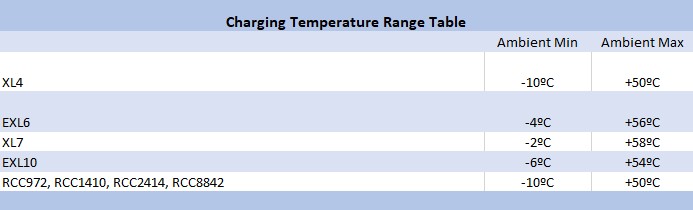
| XL4, EXL6, XL7, EXL10 | CSCAN 15.22 | June 2019 | Enhancement | Expanded the temperature range at which battery charging can occur. The Charging Temperature Range Table below lists these ambient temperature values by controller. Refer to the Horner Rechargeable Battery Operation Manual, MAN1142, for more details. | |
| XL4, EXL6, XL7, EXL10 | CSCAN 15.22 | June 2019 | |  | |
| XL4, EXL6, XL7, EXL10 | | | | Download Rechargeable Battery Operation Manual | | |
| XL4, EXL6, XL7, EXL10 | | | | Download Firmware 15.22 Release Notes | | |